Нотатки щодо випуску Krita 5.3 і 6.0
Krita 5.3, над якою ми працювали кілька років, – це випуск, сповнений довгоочікуваних функцій. Інструмент «Текст» та текстовий об'єкт було повністю переписано, але навіть якщо текст вас не вразив, є безліч покращень та корисних інструментів, таких як закриття пробілів для інструмента заповнення, панель інструментів позначення, абсолютно новий інструмент «Ніж» та багато іншого.
Відео створено David Revoy.
Krita 6
І так, це також випуск Krita 6!
Krita 6 — це наш порт Krita на Qt6, тобто, коли ви збираєте Krita 5.3 за допомогою Qt5, ви отримуєте Krita 5.3, але коли ви збираєте її за допомогою Qt6, ви отримуєте Krita 6. Ми робимо це тому, що кілька дистрибутивів Linux вже припиняють підтримку Qt5. Перейшовши на Qt6, ми забезпечимо роботу Krita на довгі роки.
Але підтримка Qt6 — це не єдине, що пропонує Krita 6. Вона також постачається з підтримкою Linux Wayland, зокрема повнофункціональною реалізацією протоколу керування кольором Wayland. Це нарешті додало підтримку високого динамічного діапазону (HDR) у версію Krita для Linux!
Протокол керування кольором Wayland ще дуже незрілий. Це була ключова функція, на яку ми чекали всі ці роки: якщо на старих серверах дисплеїв X11 ми завжди могли визначити, на якому моніторі ми знаходимося та який профіль кольорів пов'язати з цим монітором, то архітектура Wayland розроблена таким чином, щоб не розголошувати цю інформацію так просто.
Це проблема для програми для малювання, основною функцією якої є повністю інтегроване керування кольорами. У новій версії протокол керування кольорами Wayland надасть нам всю необхідну інформацію для забезпечення керування кольорами зображень, включаючи все, що нам потрібно знати для показу зображень з високим динамічним діапазоном. Оскільки ця частина Wayland ще дуже незріла, її використання означає, що вам знадобиться сучасний засіб для керування вікнами, у якому передбачено її підтримку. Ми самі рекомендуємо засіб, для якого було написано код: KWin 6.4.4 і новіші версії.
На додачу до керування кольорами, підтримка Wayland також означає підтримку дробових значень для масштабування та показу 10-бітових кольорів на дисплеї.
Окрім підтримки Wayland, Krita 6 і 5.3 мають абсолютно однакові можливості.
Зверніть увагу, що Krita 6 ще не доступна для Android, і що Krita 6 на всіх платформах вважається ранньою версією.
Також між Qt5 та Qt6 відбулося так багато змін, що неминуче, що в Krita 6 з'являться помилки, яких немає в Krita 5. Відтепер ми зосередимося на тому, щоб зробити Krita 6 максимально стабільною.
Ознайомтеся із підручником, щоб дізнатися більше про керування кольорами у Wayland
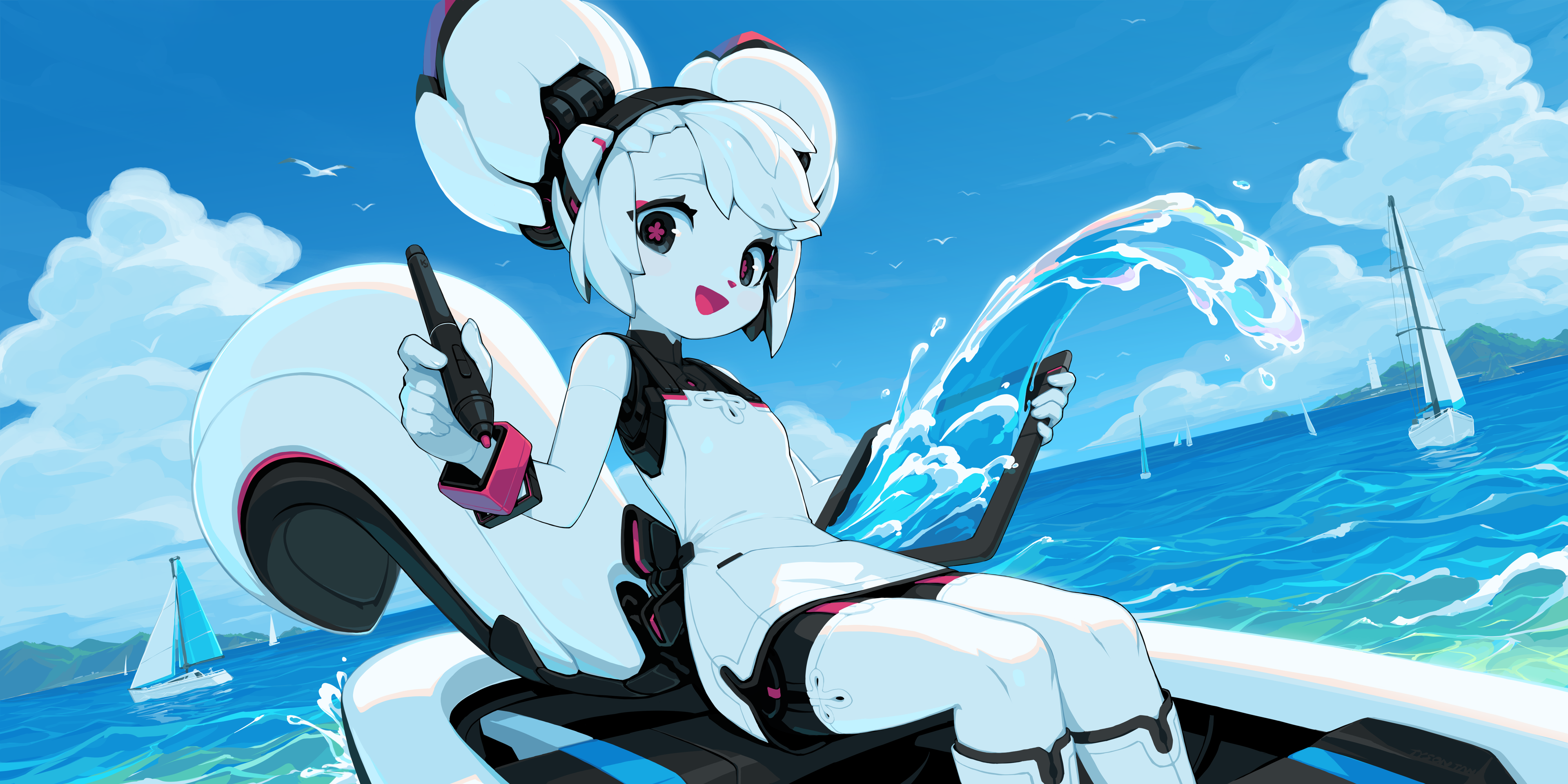
'Kiki Paints Over the Waves' by Tyson Tan
Інструмент «Текст»
Інструмент роботи з текстом у версії 5.3 було повністю перероблено! Головною перевагою, звичайно ж, є те, що текст тепер можна редагувати безпосередньо на полотні, з повною підтримкою звичайної взаємодії з клавіатурою та мишею, а також підтримкою IME. Але на цьому ми не зупинилися! Давайте розглянемо деякі основні моменти:
Текст з перенесенням, текст у формі і текст за контуром
У Krita тепер є можливість автоматичного перенесення рядків тексту. Ви можете перетягнути область, щоб створити просту область обтікання текстом, або клацнути на фігурі, щоб текст було розташовано всередині. Відповідно до SVG 2, область обтікання текстом може складатися з кількох фігур, причому деякі додаються, а інші віднімаються від кінцевої області обтікання.
Окрім перенесеного тексту, ви також можете налаштувати текст так, щоб він розташовувався за контуром, а також контролювати початкову позицію.
Бічна панель властивостей тексту
Бічна панель властивостей тексту надає вам змогу стилізувати текст. Ця окрема панель уможливлює редагування не лише поточного тексту, позначеного інструментом «Текст», але й кількох текстів, позначених інструментами позначення форм. Щоб ви не загубилися у списку з понад 50 властивостей, які можна редагувати, Krita типово приховує властивості, які не було встановлено для позначеного тексту або його абзацу. Ви можете налаштувати правила видимості кожної з властивостей на свій смак, що надасть вам можливість приховати властивості, які ви ніколи не використовуєте, або показати всі властивості незалежно від цього.
Значна частина роботи над цим стосувалася засобу вибору шрифтів, оскільки це вимагало спеціальної індексації шрифтів у вашій системі. Завдяки цій роботі тепер ви можете вибирати всі типи шрифтів, від прихованих postscript до сучасних змінних шрифтів OpenType (включаючи всі осі) всередині засобу вибору шрифтів. Крім того, шрифти як ресурси тепер можна позначати мітками, шукати, і програма показуватиме локалізовані назви (і взірці), якщо вони є всередині шрифту.
Якщо властивостей понад 50, може бути важко запам'ятати улюблені. Щоб полегшити життя, у новій версії Krita передбачено набори стилів, які надають змогу швидко застосовувати вибрані властивості до поточного тексту або використовувати їх як основу для нового тексту.
Палітра гліфів
Ще одним новим доповненням є палітра гліфів. Палітра гліфів надає змогу вибирати альтернативні гліфи, які можуть бути наявними у поточному шрифті. Хоча панель властивостей тексту надає змогу налаштовувати всі можливості OpenType у шрифті, палітра гліфів набагато зручніша. Крім того, вона надає змогу вибирати варіанти символів Unicode, що буде набагато зручніше для тих, хто верстає шрифти ієрогліфічними писемностями.
Режим поліграфії
Окрім бічної панелі властивостей тексту, ви можете редагувати низку властивостей на полотні за допомогою нового режиму поліграфії. Цей окремий режим у текстовому інструменті надає у ваше розпорядження елементи керування для редагування розміру шрифту, зсуву базової лінії, висоти рядка та переважної базової лінії безпосередньо на полотні. Якщо текст не переноситься автоматично, ви навіть можете редагувати розташування кожного окремого гліфа!
Інше:
- Усі властивості було трохи вдосконалено, а це означає, що у Krita передбачено повну підтримку домінанти CSS-Inline-3 та базової лінії вирівнювання. Ці властивості корисні для налаштування вирівнювання тексту різних розмірів, коли вони написані такими писемностями, як деванагарі або хань.
- Нові віджети для роботи з текстом написано на QML, наше перша спроба використання сучасного QML.
- Побіжним результатом роботи над текстовим інструментом є невелике пришвидшення редагування векторних форм, а можливості «Позначити все»/«Зняти позначення» тепер працюють у всіх векторних інструментах.
- Аналогічно, тепер нами реалізовано підтримку властивості SVG 2 paint-order, яка надає змогу малювати рамки позаду тексту.
Сторінки підручника: Робота з текстом, Інструмент «Текст», Бічна панель властивостей тексту, Ресурс гарнітури шрифтів і Ресурс набору стилів.
На цю тему було написано різноманітні технічні дописи у блоґах: Шрифти, Open Typeп, Метрики шрифтів, різні інші властивості, Текст у режимі форми і поліграфії.

Акцент Спільноти: Weird Meeting від Sad_Tea
Інструменти
- Додано новий інструмент редагування панелі коміксів (MR 2331, підручник).. За допомогою цього інструменту ви можете швидко розділяти та об'єднувати векторні об'єкти, що спрощує налаштування компонувань панелі для коміксів.
- Довільне обертання обмежувальної рамки трансформації (MR 2113, підручник) – Наш інструмент трансформації малює обмежувальну рамку навколо позначеної області. Однак, вона завжди була спрямована в напрямку пікселів, що може бути досить громіздким під час перетворення зображення, намальованого під кутом. Тепер ви можете обертати обмежувальну рамку перетворення за допомогою Ctrl + Alt, щоб вона відповідала візуальному куту фрагмента, який ви перетворюєте.
- Прискорення режиму перетворення розчинення (MR 2461 – Режим розчинення у інструменті перетворення значно пришвидшено.
- Коригування згладжування залежно від швидкості мазка (MR 2192, підручник) – Це надає змогу зменшити згладжування штриха зі збільшенням швидкості. Ідея полягає в тому, що більша частина тремтіння мазка виникає під час повільного малювання, тому, природно, згладжування має бути вищим, коли мазок пензлем триває довше. І навпаки, швидкі мазки пензлем потребують меншого згладжування.
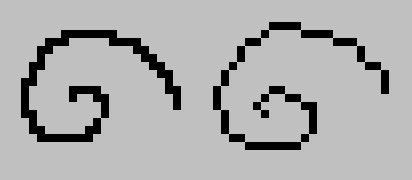
- Режим згладжування піксель-арту (MR 2158, підручник) – проєкт Кена Ло в рамках програми Google Summer of Code 2024 року, стабілізатор піксель-арту забезпечує кращі результати під час малювання лінією товщиною в один піксель.
- Панель інструментів позначення (MR 2422, підручник) – проєкт Росса Розалеса «Summer of Code Google 2025», панель інструментів позначення містить рухому панель, поки активним є позначення.
- Додано режим «Копіювати з перенесенням за інтервалами» для мультипензля (MR 1968, підручникl) – Це надає змогу малювати кількома пензлями із заданими інтервалами.
- Покращено введення чисел у інструменті вибору форми (MR 2199) – Тепер ви можете клацнути правою кнопкою миші на них, щоб встановити одиниці вимірювання.

- Інструмент заповнення також отримав певну частку уваги, тепер у нього є функція Закриття прогалин (MR 2050 та MR 2079, підручник), яка надає йому змогу закривати прогалини у роботі з лініями під час визначення області для заповнення.

Акцент Спільноти: Skeleton and Cat від ShangZhou0
Допоміжні засоби

- Налаштовування допоміжних віджетів (MR 1966) – Допоміжний віджет на полотні було перероблено, а також додано функцію дублювання.
- Помічник криволінійної перспективи. (MR 1960 та MR 2055, підручник) -- Помічник криволінійної перспективи є альтернативою помічнику точок «риб'яче око», він використовує дуги замість еліпсів.
Фільтри і шари
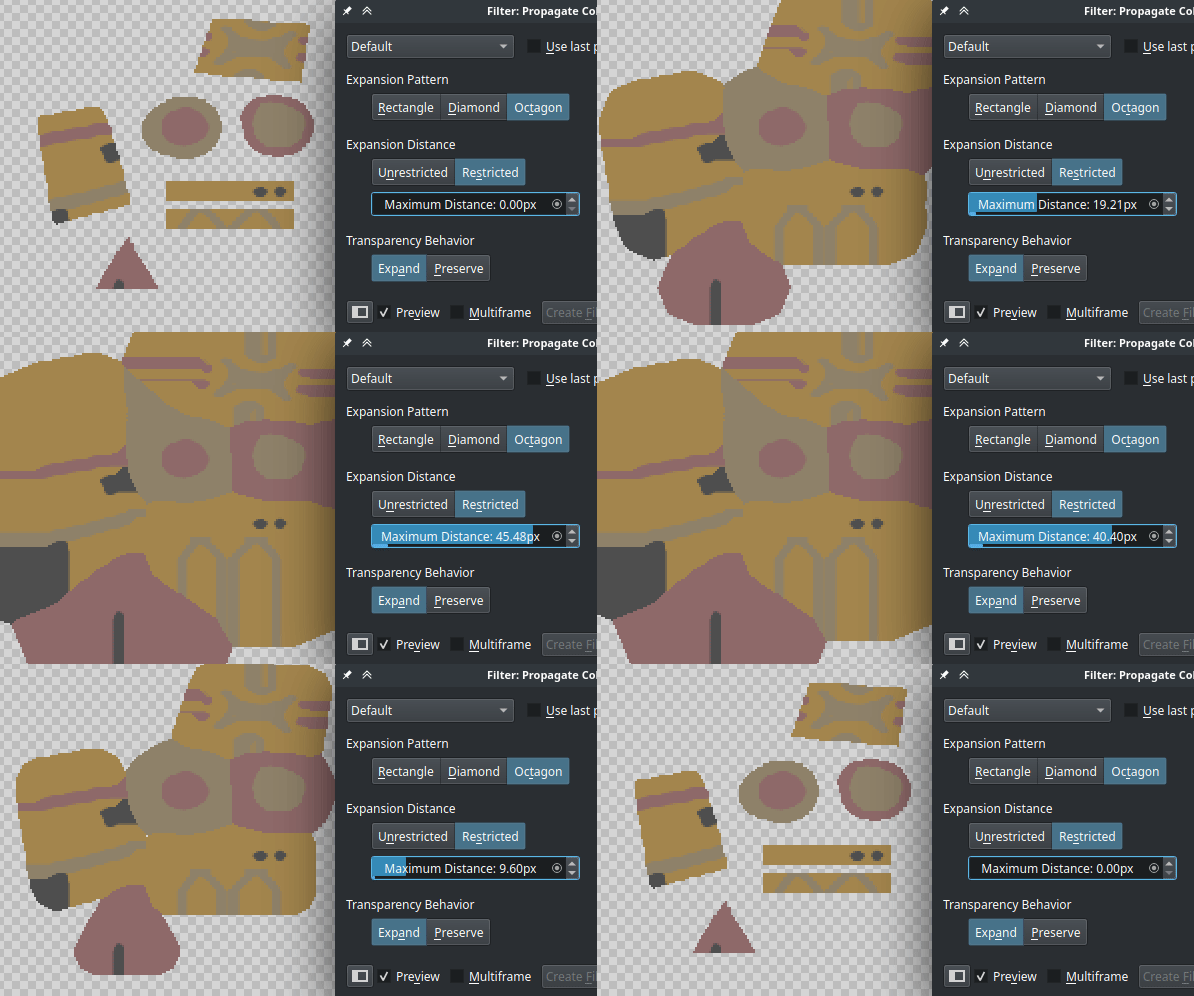
- Додано фільтр «Поширення кольорів». Цей фільтр надає змогу змінювати зображення з кольорами та прозорістю таким чином, щоб його кольори розширювалися в прозорі області. Така можливість дуже корисна для робочих процесів з просторовими текстурами та текстурами в іграх. Там прозорість часто потрібно обробляти як окрему текстуру, і коли кольори підготовлені за допомогою цього фільтра, це зменшує ймовірність проблем із вирівнюванням між прозорістю та кольорами. (MR 2161), підручник)
- Скидання прозорості (MR 1860, підручник — фільтр, пов'язаний із вищезгаданими фільтрами. Якщо у кольорі прозорого пікселя є значення, використання скидання прозорості надасть вам змогу встановити для усіх повністю прозорих пікселів прозорість чорного кольору.
- Усі наші режими змішування пройшли подвійну перевірку на підтримку розширеного динамічного діапазону. Раніше Krita іноді обрізала кольори розширеного діапазону під час компонування з певним режимом змішування, навіть якщо у режимі змішування було передбачено його підтримку. Тепер так програма працюватиму у будь-якому режимі змішування, у якому передбачено підтримку розширеного динамічного діапазону. (MR 2294)
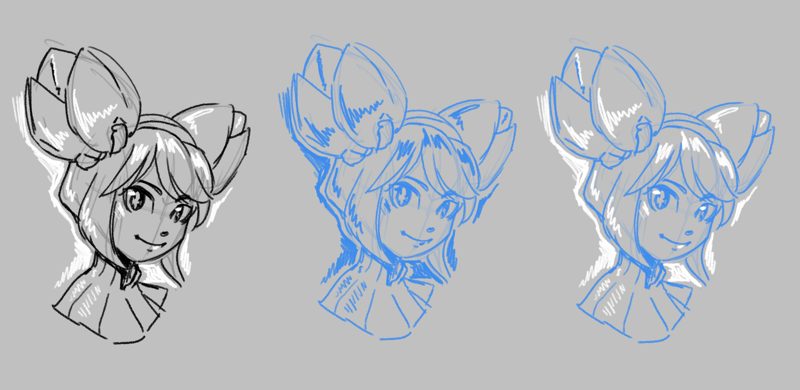
- Маска швидкого накладання кольору. Фільтр, який розфарбовує ескіз заданим кольором. Він відрізняється від наявного фільтра HSV, оскільки оптимізований для швидкості та швидкого використання, зі спеціальною кнопкою на панелі шарів. Це буде корисно для художників, які готують свій ескіз до малювання. (MR 2285, 2318, 2303 та 2282, підручник)
- Комбінації клавіш для перетворень тепер працюють над декількома шарами. Під час використання комбінацій клавіш обробки шарів «Віддзеркалити», «Обертати», «Масштабування», «Нахил» та «Зсув», коли вибрано кілька шарів, буде перетворено усі шари одразу (MR 1811).

Акцент Спільноти: Curly Hair від Celes
Бічні панелі
- Режим захоплення в реальному часі для панелі запису. Раніше панель запису захоплювала зображення лише раз на кілька кадрів з міркувань продуктивності. Тепер до панелі запису додано багатопотокове захоплення, що дозволяє записувати у режимі реального часу (MR 2010).
- Бічні панелі тепер можна додавати до контекстної палітри. Це замінює редактор пензлів на полотні, який, у свою чергу, було змінено на бічні панелі. Крім того, бічні панелі тепер також можна додавати як контекстне вікно на панелі інструментів, додавши «Бічну панель» до панелі інструментів (MR 2062, MR 2104).
- Різні покращення було внесено до механізмів сіток та напрямних. Зокрема, додано новий ізометричний режим, який трохи більш передбачуваний у використанні та може використовуватися для шестикутних сіток. Налаштування кольорів сітки та напрямних тепер зберігається в документі. І, нарешті, є можливість вимкнути горизонтальні або вертикальні лінії в прямокутній сітці, що дозволяє отримати сітку, яка є простим лінійним візерунком. (MR 2090, підручник)
Пензлі:
Було реалізовано два удосконалення для роботи з текстурами у пензлях.
- Режим м’якого текстурування для варіанта «Візерунок» (MR 2068, підручник) -- Типово варіант з текстуруванням Krita використовує параметри потужності та візерунка разом, щоб обмежити пензель візерунком, залежно від потужності. Це створює гарний текстурований штрих, подібний до використання сухого пензля на текстурованому аркуші паперу в реальному житті. Новий режим «М'яке текстурування» перемикає поведінку потужності, надаючи змогу контролювати, наскільки візерунок впливає на пензель, при цьому за низьких значень візерунок невидимий. Це більше схоже на перемикання між вологим та сухим пензлем з часом.
- Візерунок «Автоматичне інвертування для гумки» (MR 2264) – Під час роботи з варіантом текстури може виникнути потреба у збереженні цілісності текстури навіть під час витирання. З цієї причини ми додали параметр «Автоматичне інвертування для гумки», який інвертуватиме текстуру під час перемикання в режим витирання.

- Режим кутів для кривих (MR 2191, підручник) – Рушій пензлів Krita широко використовує криві для налаштовування впливу різних датчиків на пензель. Типово точки на цій кривій є гладкими кубічними кривими, що корисно в більшості випадків. Однак іноді потрібно трохи більше контролю, тому у Krita 5.3 тепер є можливість створювати гострі кути за допомогою Ctrl + клацання на певному вузлі. Крім того, ця можливість є корисною для роботи фільтрів, де використано криві.
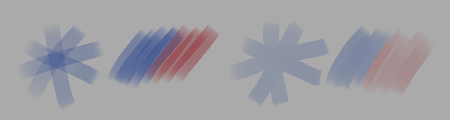
- Режим змішування «Маркер» (MR 2375, manual) — режим змішування, який запобігає накопиченню непрозорості на кратних мазках. При використанні з режимом нарощувального малювання, це дає той самий ефект, що й той самий режим у Drawpile або інструменті «Маркер» в інших програмах. На відміну від режиму «Більше», «Маркер» змішує кольори нормально, навіть якщо це не змінює непрозорість шару.

Time Keeper від Elixiah
Файли:
- Підтримка Radiance RGBE (.hdr) (MR 1806) – у Krita 5.3 передбачено підтримку завантаження та збереження файлів Radiance RGBE. Це старіший, але досить широко використовуваний формат зображень HDR, і він має бути корисним для людей, які працюють із зображеннями із розширеним динамічним діапазоном.
- Новий конструктор пакетів (MR 1802) -- проєкт GSoC від Srirupa Datta, який полягав у оновленні конструктора пакетів. Тепер він намагається провести вас через процес створення пакетів, а новою функцією є можливість зберігати у пакетах мітки.
- Jpeg-XL: уможливлено використання профілів кольорів CICP замість ICC для зберігання простору кольорів, додано можливість збереження альфа-каналу у режимі без втрат (MR 2077).
- Jpeg-XL: додано підтримку багатошарових та багатосторінкових файлів JXL на додаток до анімованих файлів JXL (MR 2411).
- Підтримка тексту, форм та напрямних для PSD (MR 1954) – Krita тепер може завантажувати та зберігати форми, векторні маски та напрямні з PSD та до PSD. Крім того, вона може завантажувати текст з PSD, включаючи розширені відомості щодо тексту, зокрема текст за контуром та можливості Open Type. Збереження тексту в PSD можливе, але, на жаль, більш обмежене через складність формату.
Додатки мовою Python:
У цьому випуску реалізовано декілька покращень програмного інтерфейсу Python. Найпомітнішим є те, що тепер у нас є програмний інтерфейс для малювання мазків пензля. (MR 2195), (MR 2198), (MR 2211).
Було додано обгортки для таких віджетів qt:
І нарешті, нами додано більше методів для…
- Панелі ескізів (MR 2087)
- Сіток і напрямних (MR 2087)
- Стану автоматичного збереження документів (MR 2160)
- Панорування полотном (MR 2338)
Нарешті, було додано такі комплектні додатки python:
- Додаток мутації пензля (MR 2322) — розширення мовою python для Krita, яке додає варіації пензля за допомогою рандомізації параметрів, якою керує художник. Якщо задіяно додаток мутації, діапазони мутацій параметрів пензля (розмір, обертання, колір тощо) можна налаштувати на бічній панелі мутації, а випадкові мутації можна запускати вручну за допомогою дії «Мутація» (типово пов'язано з клавішею «z»).
- Знову додано бічну панель палітри Python (MR 2374) – знову увімкнено бічну панель палітри Python. Цю бічну панель призначено для експериментів з редагуванням палітри, передбачено підтримку експорту у формати gpl та svg.
- Бічна панель кнопок робочого процесу (MR 2210) – Бічна панель кнопок робочого процесу надає змогу налаштувати власну невелику панель з усілякими кнопками, особливо з можливістю впорядковувати та змінювати їхній розмір на власний розсуд.

First of 2025 від Montie (@carlomontie, @carlo_montie)
Інше
- Окремі курсори гумки для інструментів, що не є пензлем (MR 1624) – Під час малювання іноді важко згадати, чи перебуваєте ви в режимі гумки, тому для всіх курсорів інструментів було оновлено значок гумки.
- Налаштування нахилу пера (MR 2314, MR 2337, підручник) – у Krita передбачено підтримку напрямку нахилу, про який повідомляють деякі моделі планшетів для малювання. Однак не всі планшети підтримують нахил, і, крім того, якщо ви створюєте пензель як шульга, він може відчуватися зовсім інакше для правші. З цією метою було додано елементи керування, які надають змогу додавати додаткове зміщення нахилу пера для різних рук, а також можливість встановити типовий нахил пера, коли для планшета не передбачено підтримки нахилу.
- Оновлення проби кольорів (MR 2279, підручник) – раніше наша проба кольорів не дозволяла компенсацію чорних точок для обох перетворень, що призводило до різниці у зовнішньому вигляді порівняно з перетворенням документа безпосередньо до зазначеного профілю. Ми оновили налаштування проби кольорів, щоб дозволити налаштування обох перетворень, з типовими значеннями для використання або поточної конфігурації профілю монітора, або імітації білого та чорного кольорів паперу (Примітка: Користувачі Wayland, через новизну протоколу Wayland, проба кольорів працюватиме дещо інакше в режимі абсолютної колориметрії, перегляньте посібник для отримання додаткової інформації).
- Підтримка палітри CSS (MR 2119) – бічна панель палітри тепер може завантажувати файли .css з класами, що представляють зразки.
- Додаткові дії доступні у налаштуваннях введення на полотні (MR 1801) – це додає різноманітні кнопки дій, таких як вибір кольору, скасування вибору, активація шару та активація деяких інструментів, до налаштувань введення на полотні, щоб їх можна було активувати за допомогою сенсорних жестів.
- Збереження загального журналу кольорів, можливість збереження для кожного окремого документа (MR 1424) – журналу кольорів тепер можна зберігати як на загальному рівні, так і для кожного документа.
- Комбінації швидкого доступу для масштабування тепер мають можливість окремо змінювати масштаб до вказівника або до центра полотна (MR 2152) – раніше Krita використовувала мишу для масштабування до вказівника та клавіші для масштабування до центра полотна. Цей поділ чітко визначає, для якого з цих двох способів масштабування використовуватиметься комбінація швидкого доступу. Тепер типовим є масштабування до центра полотна.
Учасники розробки
Особлива подяка усім учасникам розробки, який перелічено за абеткою:
- Agata Cacko – удосконалення засобу розчинення, інструмент «Ніж».
- Aries Moczar – переписування допоміжного віджета редактора
- Bourumir Wyngs – підтримка збереження журналу кольорів.
- Carsten Hartenfels – підтримка Android, режим злиття за маркерами.
- Deif Lou – додавання режиму м'яких текстур, точки перегину на кривих редактора пензлів.
- Дмітрій – рецензування усіх запитів щодо об'єднання, переписування пробника кольорів.
- Emmet – додаток мутації, виправлення вад у роботі з анімаціями.
- Freya Lupen – реалізувала копіювання з перенесенням для мультипензля, бічна панель пензлів на полотні, а також допомога із портуванням та тестуванням різних елементів на MacOs та Android.
- Florian Reiser — режим захоплення у реальному часі для бічної панелі записувача.
- Grum999 – удосконалення лічильників розмірів у інструменті позначення за формою, покращення сіток та напрямних.
- Halla – адміністрування, портування на Qt6.
- Isaac Fleetwood – реалізував лінійний допоміжний засіб для кривих.
- Ivan Yossi – багато виправлень для MacOS та зручних удосконалень.
- Ken Lo – стабілізатор піксель-арту.
- killy |0veufOrever – стабілізатор згладжування.
- Krayton Draws – додаткові дії для жестів сенсорної панелі.
- Maciej Jesionowski – коригування для нахилу пера, накладка швидких кольорів.
- Mr. xk1000 – поділ на масштабування за центром полотна і за вказівником миші.
- Rasyuqa A H – підтримка Radiance RGBE, Jpeg XL.
- Ross Rosales – реалізував панель інструментів позначення.
- Sharaf Zaman – підтримка Android.
- Srirupa Datta – новий засіб створення пакетів
- Stuffins – обертання обмежувальної рамки перетворення
- Thomas K/Bidi – підтримка палітр у CSS.
- Timothée Giet – додано бічну панель кнопок робочого процесу, якість піктограм елементів керування.
- Wolthera – інструмент «Текст», переписування пробника, підручник і написання нотаток щодо випуску.
А також нашій спільноті художників за відгуки та звіти щодо вад під час періоду тестування.
Якщо вам цікаві подальші кроки, ознайомтеся із нашою дорожньою картою на 2026 рік!

Подобається те, що ми робимо? Підтримайте нас
Krita є вільним проєктом із відкритим кодом. Вам варто підтримати проєкт пожертвами або придбанням навчальних відео або книг! Ваша підтримка уможливлює для основної команди розробників роботу над Krita, як основним робочим проєктом.
Підтримати фінансово Придбайте щось