Note di rilascio di Krita 5.3 e 6.0
Sebbene ci siano voluti diversi anni per crearlo, Krita 5.3 è un rilascio con funzionalità ampiamente anticipate. L'oggetto e lo strumento Testo è stato completamente riscritto, ma se anche il testo ti lasciasse indifferente, sono presenti in generale moltissimi miglioramenti e strumenti utili, tra cui la chiusura degli spazi nello strumento Riempimento, una barra degli strumenti di selezione, un nuovo strumento Coltello e molto, molto altro.
Video courtesy di David Revoy.
Krita 6
Giusto, questo è anche il rilascio di Krita 6!
Krita 6 è la conversione a Qt6 di Krita, cioè, quando generi Krita 5.3 con Qt5 ottieni Krita 5.3, ma se lo generi con Qt6 ottieni Krita 6. Abbiamo adottato questo metodo perché diverse distribuzioni Linux stanno abbandonando il supporto per Qt5. Passando a Qt6, Krita sarà garantito per gli anni futuri.
Krita 6 non contiene soltanto il supporto per Qt6, ma anche il supporto per Linux Wayland, in particolare un'implementazione completa del protocollo di gestione del colore Wayland. Viene introdotto finalmente il supporto HDR alla versione Linux di Krita!
Il protocollo di gestione del colore Wayland (Wayland Color Management Protocol, WCMP) è molto giovane. È stata la funzionalità chiave che abbiamo atteso per anni: mentre sui vecchi server di visualizzazione X11 potevamo sempre capire su quale monitor ci trovavamo e quale profilo colore associare a quel monitor, l'architettura di Wayland è progettata per non rivelare queste informazioni così facilmente.
Questo è un problema per un'applicazione di pittura la cui funzionalità principale è la gestione del colore completamente integrata. Ora, il protocollo di gestione del colore Wayland ci fornirà tutte le informazioni necessarie per fornire visualizzazioni delle immagini con gestione del colore, incluso tutto ciò che dobbiamo sapere per la visualizzazione HDR. Poiché questa parte di Wayland è ancora molto giovane, utilizzarla significa che sarà necessario un gestore di finestre aggiornato che la supporti. Noi stessi consigliamo il gestore per cui è stato scritto il codice: KWin 6.4.4 e versioni successive.
In aggiunta alla Gestione del colore, il supporto Wayland significa anche supporto al ridimensionamento frazionario e la visualizzazione a 10 bit.
Supporto Wayland a parte, Krita 6 e 5.3 condividono le stesse funzionalità.
Nota che Krita 6 non è ancora disponibile per Android, e che Krita 6 su tutte le piattaforme viene considerato ancora prematuro.
Ci sono così tante differenze tra Qt5 e Qt6 che è inevitabile che saranno presenti errori in Krita 6 non presenti in Krita 5. D'ora in poi ci concentreremo su rendere Krita 6 il più stabile possibile.
Consulta il manuale per maggiori informazioni sulla Gestione del colore in on Wayland
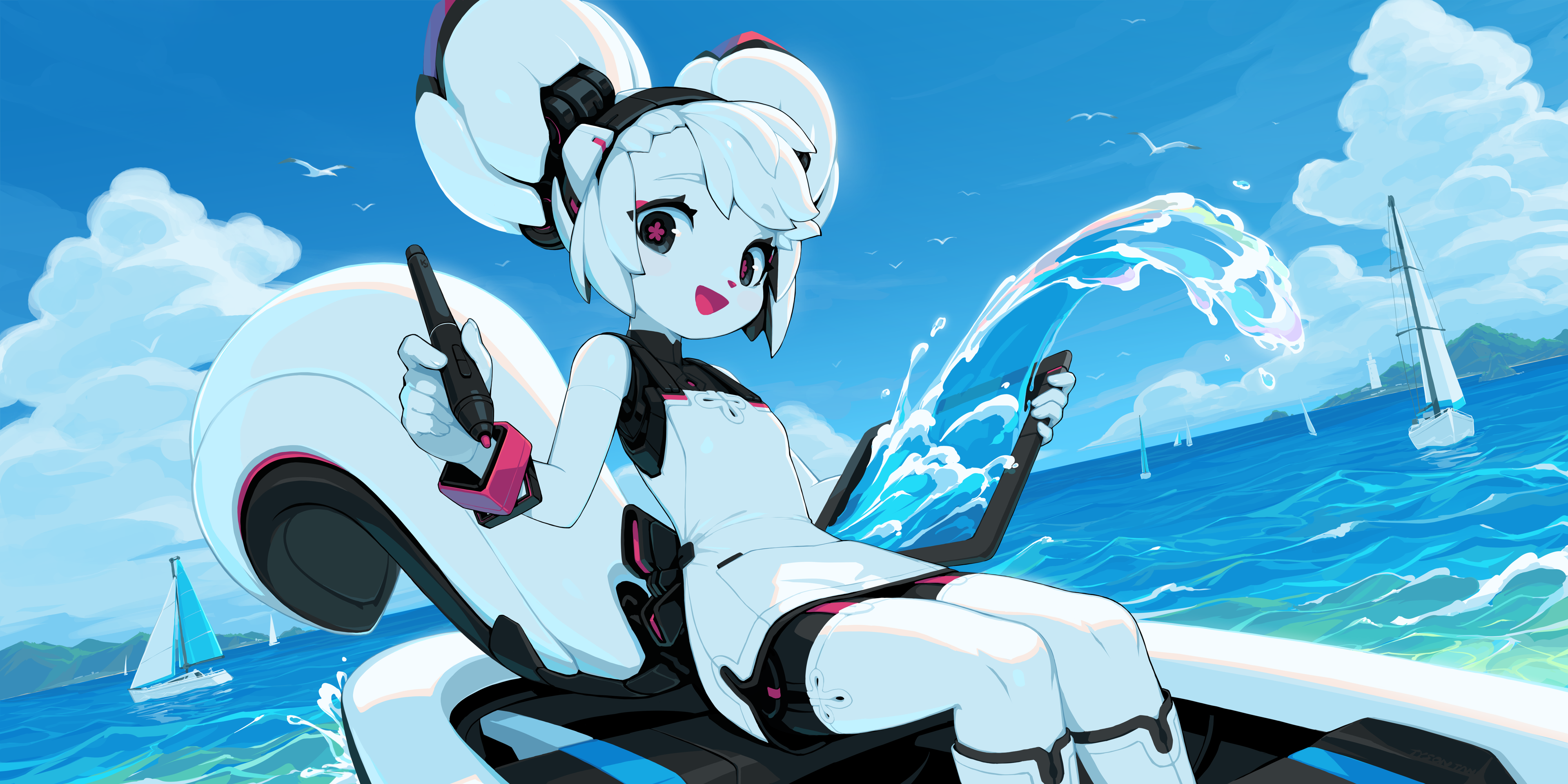
'Kiki Paints Over the Waves' by Tyson Tan
Strumento Testo
Lo strumento Testo è stato completamente rivisto nella versione 5.3! La funzionalità principale è, naturalmente, che il testo può essere modificato direttamente nella tela, con supporto completo per le usuali interazioni con tastiera e mouse, così come il supporto IME. Ma non ci siamo fermati qui! Vediamo alcune novità:
Testo a capo, Testo in forma e Testo su tracciato
Ora Krita è in grado di mandare a capo automaticamente il testo. Puoi trascinare un'area per creare una semplice area interna di a capo, o fare clic su una forma per far scorrere il testo al suo interno. Conformemente con SVG 2, l'area di flusso di testo può essere composta di più forme, con alcune che aggiungono e altre che sottraggono dall'area di flusso finale.
Testo a capo a parte, puoi anche impostare il testo in modo che segua un tracciato, così come controllare la sua posizione di partenza.
Area di aggancio Proprietà del testo
L'area di aggancio Proprietà del testo ti consente di attribuire uno stile al testo. Quest'area di aggancio separata non solo permette di modificare il testo attualmente selezionato con lo strumento Testo, ma di modificare anche più testi quando sono selezionati con gli strumenti di selezione della forma. Per garantire di non perderti all'interno delle oltre 50 proprietà modificabili, Krita nasconderà, per impostazione predefinita, le proprietà che non sono state impostate sul testo selezionato o il suo paragrafo. Puoi configurare le regole di visibilità di ciascuna di queste proprietà a piacimento, in modo da nascondere le proprietà che non usi mai o mostrarle tutte a prescindere.
Una grande parte di questo lavoro è stato fatto sul selettore dei caratteri, dato che richiedeva un'indicizzazione speciale dei tipi di carattere presenti nel tuo sistema. Grazie a questo lavoro, all'interno del selettore ora puoi selezionare tutti i tipi di carattere, dall'oscuro postscript ai moderni opentype variabili (inclusi tutti gli assi). Inoltre, i tipi di carattere ora sono risorse a cui può essere attribuito un tag, possono essere ricercate e che mostrano nomi (e campioni) localizzati, se presenti all'interno del tipo di carattere.
Con oltre 50 proprietà, è difficile ricordare i propri preferiti. Per risolvere il problema, ora Krita ha anche le preimpostazioni degli stili, che ti permettono di applicare rapidamente una selezione di proprietà al testo attivo, o usarle come base per il nuovo testo.
Tavolozza dei glifi
Un'altra nuova aggiunta è la tavolozza dei glifi. Essa ti permette di selezionare glifi alternati che potrebbero essere presenti nel tipo di carattere attualmente utilizzato. Mentre l'area di aggancio Proprietà del testo permette la configurazione di tutte le caratteristiche OpenType in un carattere, la tavolozza dei glifi è molto più comoda. Inoltre, permette di selezionare le varianti di carattere unicode, che è doppiamente utile per quelli che utilizzano la composizione tipografica nelle scritture CJK.
Modalità composizione tipografica
In aggiunta all'area di aggancio Proprietà del testo, puoi modificare diverse proprietà sulla tela con la nuova Modalità composizione tipografica. È una modalità separata nello strumento Testo che fornisce controlli per modificare la dimensione dei caratteri, lo spostamento della linea di base, l'altezza della riga e la linea di base dominante direttamente sulla tela. Quando il testo non va a capo in automatico, puoi persino modificare la posizione di ciascun singolo glifo nel dettaglio!
Varie:
- Tutte le proprietà sono state raffinate, il che significa che Krita ha il supporto completo per la linea di base allineamento e dominante CSS-Inline-3. Queste proprietà sono utili per configurare l'allineamento del testo di dimensioni differenti quando presenti nelle scritture come il Devanagari o nella scrittura Han.
- I nuovi oggetti di testo sono in QML, la nostra prima incursione nel moderno QML.
- Come effetto secondario del lavoro sul testo, ora la modifica delle forme vettoriali è un po' più veloce, e l'opzione seleziona tutto/deseleziona ora funziona in tutti gli strumenti vettoriali.
- Allo stesso modo, è supportata la proprietà SVG 2 paint-order, che consente il disegno dei contorni dietro il testo.
Manual pages: Working with Text, Text Tool, Text Properties Docker, Font Family Resource and Style Preset Resource.
Sull'argomento sono stati pubblicati nel blog diversi post (in inglese): Tipi di carattere, Open Type, Metrica dei caratteri, varie altre proprietà, Testo nelle forme e modalità di impostazione dei tipi.

Community Spotlight: Weird Meeting by Sad_Tea
Strumenti
- A new Comic Panel Editing tool was added (MR 2331, manual). With this tool, you can split and merge vector objects quickly, making it easy to set up panel layouts for comics.
- Free transform bounding box rotation (MR 2113, manual) — Our transform tool draws a bounding box around the selected area. However, this was always in the direction of the pixels, which can be quite cumbersome when transforming a picture drawn at an angle. You can now rotate the transform bounding box with Ctrl + Alt to fit the visual angle of the selection you are transforming.
- Liquify Transform Mode speedups (MR 2461 — The liquify mode in the transforms tool was greatly sped up.
- Adjust smoothing based on stroke speed (MR 2192, manual) — This allows you to reduce smoothing of a stroke with the speed. The idea is that most jitters happen when drawing slowly, so naturally the smoothing needs to be higher when the brush stroke takes longer. Conversely, fast brush strokes need less smoothing.
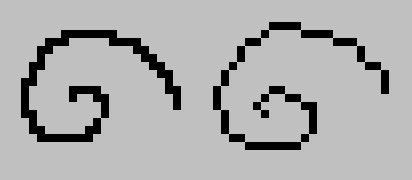
- Pixelart smoothing mode (MR 2158, manual) — Ken Lo's 2024 Google Summer of Code project, the pixel art stablizer provides better results when drawing with a single pixel line.
- Selection toolbar (MR 2422, manual — Ross Rosales' 2025 Google Summer of Code project, the selection toolbar provides a floating bar for when a selection is active.
- Multibrush has gained a 'Copy Translate at Intervals' mode (MR 1968, manual) — This allows drawing multiple brushes at set intervals.
- Improved number inputs in the shape selection tool (MR 2199) — You can now right-click these to set the units.
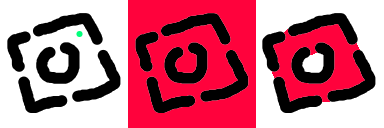
- The fill tool also got some love, now sporting Close Gaps functionality (MR 2050 and MR 2079, manual), which allows it to close gaps in the line work when determining the area to fill.

Community Spotlight: Skeleton and Cat by ShangZhou0
Assistenti

- Configuration of the assistant widgets (MR 1966) — The on canvas widget for the assistants have been overhauled, and a duplication function has been added.
- Curvelinear perspective assistant. (MR 1960 and MR 2055, manual) — The curve linear assistant is an alternative to the fish-eye point assistant, and uses arcs instead of ellipses.
Filtri e livelli
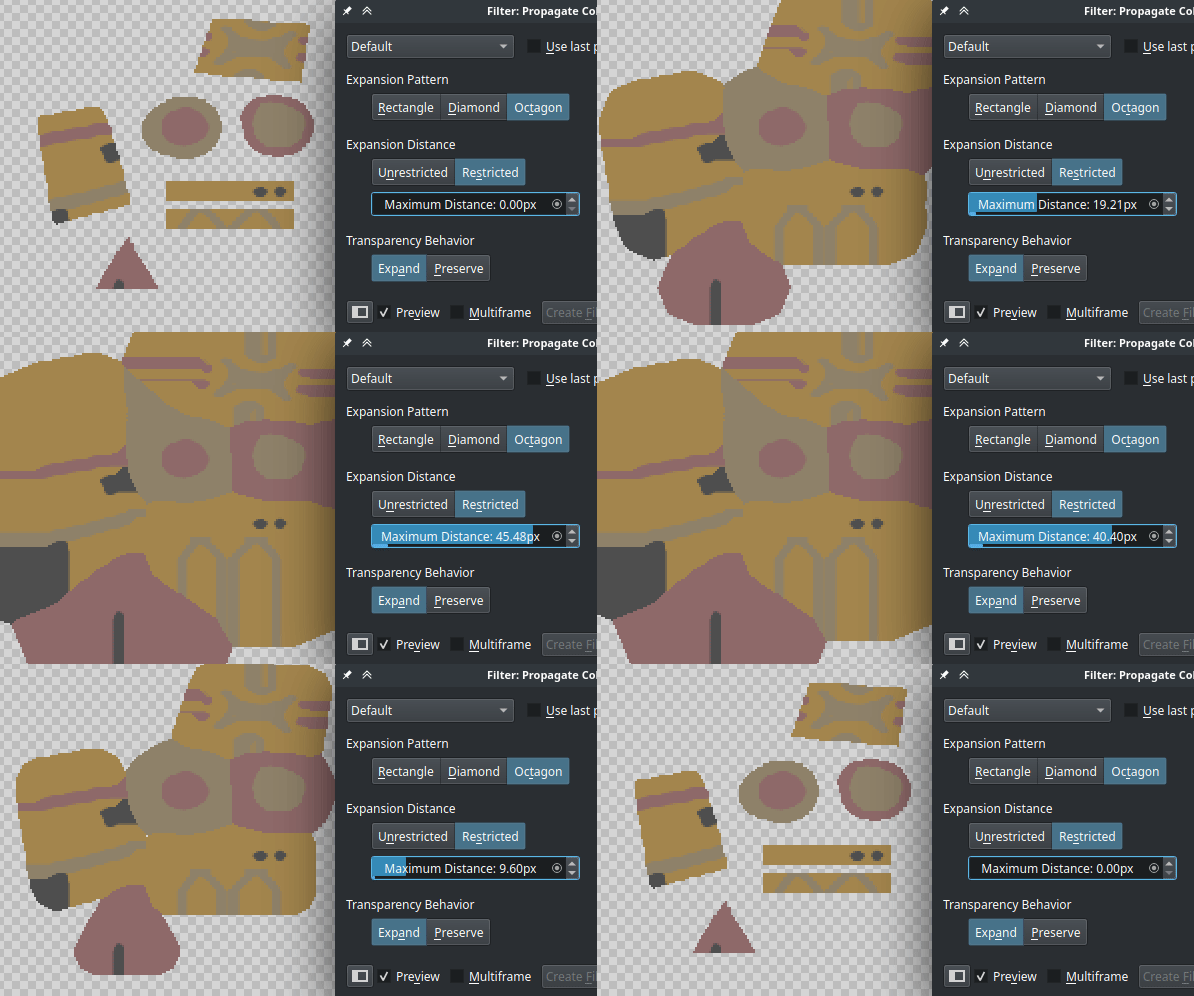
- Propagate Colors Filter has been added. This filter makes it so that an image with colors and transparency is modified to have its colors expand into the transparent areas. Such a thing is very useful for 3D and game texture workflows. There transparency often needs to be handled as a separate texture, and when the colors have been prepared with this filter, it reduces the chance of alignment issues between the transparency and the colors. (MR 2161, manual)
- Reset Transparent (MR 1860, manual — A filter related to the above. In the case that a transparent pixel has values, using reset transparent allows you to set all fully transparent pixels to be transparent black.
- All our blending modes got double checked for HDR support. Previously, Krita would sometimes clip high range colors when doing compositing with a given blending mode, even if the blending mode supported it. Now, every blend mode that supports HDR will do so. (MR 2294)
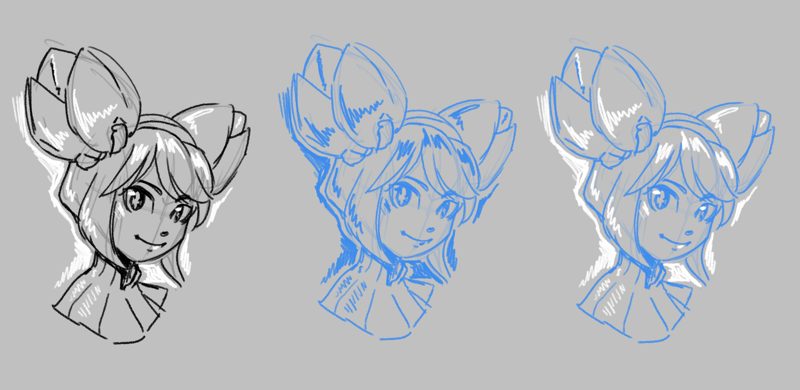
- Fast Color Overlay Mask. A filter that colorizes a sketch with a given color. This is different from the existing HSV filter, as it is optimized for speed and quick use, with a special button on the layer docker. This will be useful for artists preparing their sketch for inking. (MR 2285, 2318, 2303 and 2282, manual)
- Transform shortcuts now work on multiple layers. When using the Mirror, Rotate, Scale, Shear and Offset layer shortcuts while multiple layers are selected, all layers will be transformed (MR 1811).

Community Spotlight: Curly Hair by Celes
Aree di aggancio
- Real Time Capture Mode for the Recorder Docker. Previously, the recorder docker would only capture once every few frames for performance reasons. Now, multi-threaded capturing has been added to the docker, allowing for real time recording (MR 2010).
- Dockers can now be added to the pop-up palette. This replaces the on canvas brush editor, which in turn has been changed into a docker. As well, dockers can now also be added as a popup in the toolbar, by adding the "Docker Box" to the toolbar (MR 2062, MR 2104).
- Various improvements have been made to the Grids and Guides. In particular a new Isometric mode, which is a little bit more predictable to use, and can be used for hexagonal grids. Grid and guides color configuration is now saved to the document. And finally, there's the ability to turn off either the horizontal or vertical lines in the rectangular grid, allowing for a grid that is a mere line pattern. (MR 2090, manual)
Pennelli:
Two new improvements were added for working with textures in the brushes.
- Soft texturing mode for the Pattern option (MR 2068, manual) — By default, Krita's texturing option uses the strength and pattern options together to limit the brush by the pattern, based on the strength. This gives a nice textured stroke, much like using a dry brush on a textured piece of paper in real life. The new Soft Texturing mode switches the behaviour of strength, making it instead control how much the pattern has effect on the brush, with at low values the pattern being invisible. This is more akin to switching between a wet and a dry brush over time.
- Pattern 'Auto Invert For Eraser' (MR 2264) — When working with the texture option, you might want to keep the texture cohesive, even as you erase. For this reason, we've now added the "Auto Invert For Eraser", which'll invert the texture as you switch to erase mode.

- Corner mode for curves (MR 2191, manual) — Krita's brush engine uses curves extensively to configure the effects of various sensors on the brush. By default, the points on this curve are smooth cubic curves, which is useful in most cases. However, sometimes you want a little bit more control, so Krita 5.3 now comes with the ability to make sharp corners by Ctrl + clicking a given node. Filters using curves also benefit from this feature.
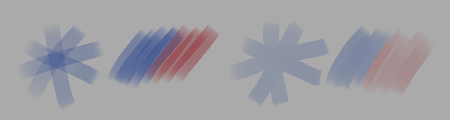
- Marker blend mode (MR 2375, manual) — a blend mode that prevents building up opacity across multiple strokes. When used with build-up painting mode, this gives the same effect as the same mode in Drawpile or the marker tool in other programs. Unlike Greater, Marker still blends colors normally even when it doesn't change the opacity of what's on the layer.

File:
- Radiance RGBE (.hdr) support (MR 1806) — Krita 5.3 now has support for loading and saving Radiance RGBE files. This is an older but fairly widely used HDR image format, and it should be a boon for people working with HDR images.
- New Bundle Creator (MR 1802) — Srirupa Datta's GSoC project, which consisted of overhauling the bundle creator. It now tries to guide you through the bundle creation process, with a new feature being the ability to store tags into bundles as well.
- Jpeg-XL: You can now use CICP instead of ICC color profiles to store the color space, as well as save alpha in lossless mode (MR 2077).
- Jpeg-XL: Support was added for Multi-Layered and Multi-Pages JXL files in addition to animated JXL files (MR 2411).
- Support for Text, Shapes and Guides for PSD (MR 1954) — Krita can now load and save shapes, vector masks and guides from and to PSD. In addition, it can load text from PSD, including the advanced text information, like text on path and open type features. Saving text to PSD is possible, but unfortunately more limited due the complexity of the format.
Estensioni Python:
This release contains several python API improvements. Most notable is that we now have an API for painting brushstrokes (MR 2195, MR 2198 and MR 2211).
Wrappers were added for the following qt widgets:
And finally we added more methods to...
- Scratchpad (MR 2087)
- Grids and Guides (MR 2087)
- Document autosave state (MR 2160)
- Canvas panning (MR 2338)
Finally, the following bundled python plugins were added:
- Brush Mutator Plugin (MR 2322) — A python extension for Krita which adds brush variation through artist-invoked settings randomization. When the Mutator extension is active, brush parameter (size, rotation, color, etc.) mutation ranges can be configured in the "Mutator Docker", and random mutations can be manually triggered via the "Mutate" action (bound to "z" by default).
- Python Palette Docker re-added (MR 2374) — The python palette docker was ree-nabled. This docker is largely meant for palette editing experiments, having support for export to gpl and svg.
- Workflow buttons docker (MR 2210) — The workflow buttons docker allows you to configure your own little docker with all sorts of buttons, with a highlight being the ability to order and resize them to your choosing.

First of 2025 by Montie (@carlomontie, @carlo_montie)
Altro
- Separate eraser cursors for non-brush tools (MR 1624) — When drawing it can sometimes be hard to remember whether you are in eraser mode, so there's an update for all the tool cursors with an eraser icon.
- Pen tilt tweaks (MR 2314, MR 2337, manual) — Krita has support for the tilt direction reported by some models of drawing tablets. However, not all tablets support tilt, and furthermore, if you create a brush as a left-handed user, it can feel very different for a right handed user. To that end controls were added to allow adding extra pen tilt offset for different handedness, as well as the ability to set a default pen tilt when the tablet does not support tilt.
- Soft Proofing overhaul (MR 2279, manual) — Previously, our softproofing did not allow black point compensation on both transforms, leading to a difference in looks compared to converting the document to said profile directly. We've overhauled the softproofing settings to allow configuring both transforms, with defaults to use either the current monitor profile configuration or simulate paper white and black (Note: Wayland users, due the newness of the Wayland protocol, softproofing will behave a little differently in Absolute Colormetric mode, check the manual for more details).
- CSS palette support (MR 2119) — The palette docker can now load .css files with classes representing the swatches.
- More actions available in Canvas Input Settings (MR 1801) — This adds a variety of actions, like color sampler, deselect, layer activation and some tool activation to the canvas input settings so they can be activated by touch gestures.
- Save global color history, option to save per document (MR 1424) — Color history can now be saved either globally or per document.
- Zoom shortcuts now have the ability to zoom to mouse or zoom to canvas center separately (MR 2152) — Before Krita would use the mouse to zoom to cursor and the keyboard keys to zoom to center of the canvas. This split up makes it explicit to which of the two a shortcut will zoom. The default will now zoom to canvas center.
Collaboratori
A special thanks goes out to all our contributors, listed alphabetically:
- Agata Cacko — Liquify improvements, Knife tool.
- Aries Moczar — Assistant Editor Widget Redesign
- Bourumir Wyngs — Saving Color History support.
- Carsten Hartenfels — Android support, Marker blend mode.
- Deif Lou — Added Soft Texture Mode, Cusps for the brush editor curves.
- Dmitry — Reviewed all the MRs, softproofing overhaul.
- Emmet — Mutator plugin, animation bugfixes.
- Freya Lupen — Provided copy translate for multibrush, on canvas brush docker and helped a ton with porting and testing things on MacOs and Android.
- Florian Reiser — Real Time Capture Mode for the recorder docker.
- Grum999 — Improvements to the dimension spinboxes in the shape selection tool, grids and guides improvements.
- Halla — Administration, Qt6 port.
- Isaac Fleetwood — Provided the curve linear assistant.
- Ivan Yossi — many MacOS bugfixes and quality of life improvements.
- Ken Lo — Pixel Art Stabilizer.
- killy |0veufOrever — Smoothness stabilizer.
- Krayton Draws — More shortcut actions for touch gestures.
- Maciej Jesionowski — Pen Tilt Tweaks, Fast Color overlay.
- Mr. xk1000 — Zoom to Canvas Center/Mouse Cursor split.
- Rasyuqa A H — Radiance RGBE support, Jpeg XL.
- Ross Rosales — Provided the selection tool bar.
- Sharaf Zaman — Android support.
- Srirupa Datta — new Bundle Creator
- Stuffins — Rotating the transformation bounds.
- Thomas K/Bidi — CSS palette support.
- Timothée Giet — Added workflow button docker, handles icon quality.
- Wolthera — text tool, soft proofing overhaul, manual and writing the release notes.
As well as our community of artists, for providing feedback and bug reports during the beta period.
If you're curious what we're going to do next, check out the 2026 roadmap!

Ti piace quello che facciamo? Sostienici
Krita è un progetto libero e open source. Valuta di sostenere il progetto con donazioni o con l'acquisto di video formativi o dell'artbook! Col tuo sostegno possiamo continuare a far lavorare a tempo pieno il nostro team principale su Krita.
Fai una donazione Compra qualcosa