איך לתמוך דרך KickStarter
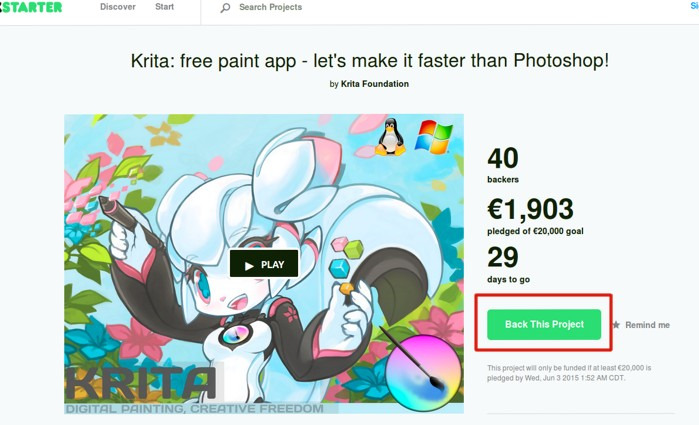
Step 1: Back the KickStarter Page
Kickstarter only has an English website, so all screenshots will be in English. If you use Google Chrome, you might be able to right click on the pages and click "Translate to xxx". This will make these steps much easier.
Visit the KickStarter page and click the "Back This Project" button
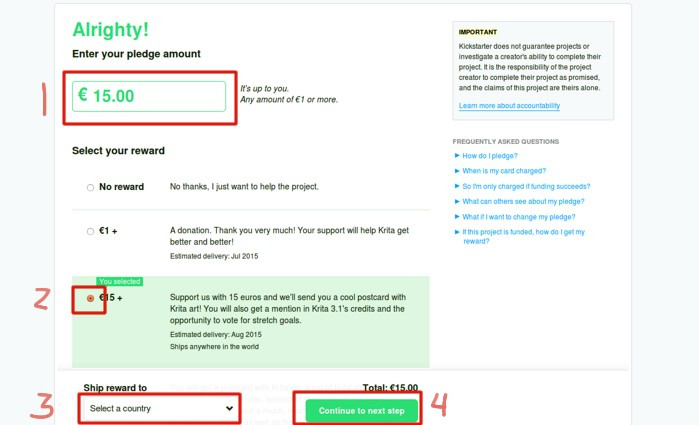
Step 2: Enter your Pledge Amount
Enter your pledge amount and select a reward. If you select a reward that involves shipping, you'll be prompted to include your country for extra shipping costs.
- נא לבחור את הסכום שלך בדולרים
- נא לבחור את התשורה להלן. הסכום יהיה בשווי התשורה או יותר.
- נא לבחור את המדינה שלך
- ללחוץ על „Continue to next step” (להמשיך לשלב הבא)

Step 3: Log in to KickStarter Account
If you have a Facebook account, you can use that to log in. Otherwise, you will have to create a new KickStarter account if you don't have one.
- שם מלא
- כתובת דוא״ל
- מילוי כתובת דוא״ל שוב
- סיסמה
- מילוי סיסמה מחדש
- ללחוץ על „לרשום אותי!”
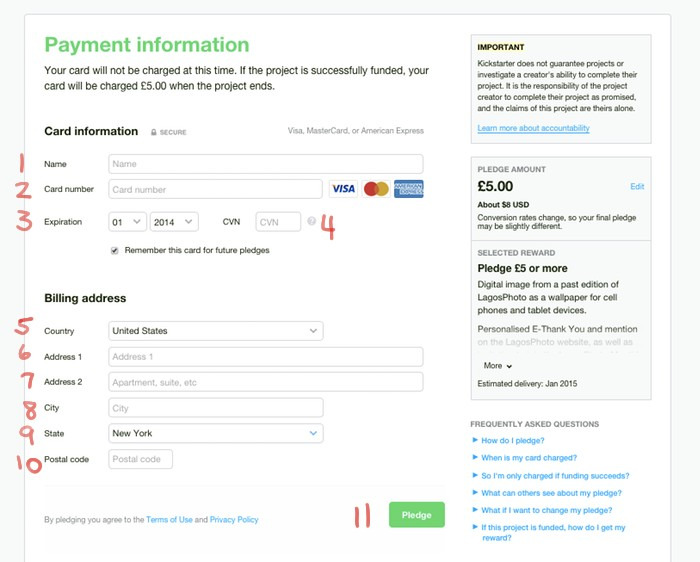
שלב 4: נא למלא את פרטי התשלום שלך
- שם
- מספר הכרטיס
- חודש ושנת תפוגה
- מס׳ בגב הכרטיס
- מדינה
- כתובת 1
- כתובת 2
- עיר
- מדינה
- מיקוד
- ללחוץ על כפתור „התחייבות”

Step 5: Complete!
You'll receive a confirmation email with your pledge details