Krita 5.3 and 6.0 Release Notes
Several years in the making, Krita 5.3 is a release filled with long anticipated features. The text tool and object has been completely rewritten, but even if text leaves you cold, there's a ton of improvements and useful tools across the board, like gap closing for the fill tool, a selection toolbar, an all new knife tool and much much more.
Video courtesy of David Revoy.
Krita 6
That's right, this is also a release of Krita 6!
Krita 6 is our Qt6 port of Krita, that is, when you build Krita 5.3 with Qt5, you get Krita 5.3, but when it is build with Qt6, you get Krita 6. We are doing this because several Linux distributions are already dropping support for Qt5. By switching to Qt6 we will have future proofed Krita for years to come.
But support for Qt6 isn't the only thing Krita 6 brings. It also comes with Linux Wayland support, in particular a full featured implementation of the Wayland Color Management protocol. This finally brings HDR support to the Linux version of Krita!
The Wayland Color Management Protocol is still very young. It was the key feature we have been waiting for all these years: where on the older X11 display servers we could always figure out on which monitor we were on and which color profile to associate with that monitor, Wayland's architecture is designed around not giving away that information so easily.
This is a problem for a painting application which core feature is fully integrated color management. Now, the Wayland Color Management Protocol will provide us with all the information we need to provide color managed views of images, including everything we need to know for HDR display. Because this part of Wayland is still very young, using it means you will need an up-to-date window manager that supports it. We ourselves recommend the manager the code has been written against: KWin 6.4.4 and above.
In addition to Color Management, Wayland support also means support for fractional scaling and 10 bit display.
Beyond the Wayland support, Krita 6 and 5.3 share all the same features.
Note that Krita 6 is not available for Android yet, and that Krita 6 on all platforms is considered early access.
There are also so many changes between Qt5 to Qt6 that it is inevitable that there will be bugs in Krita 6 that are not present in Krita 5. Our focus will from now on be on making Krita 6 as stable as possible.
Check the manual for more info on Wayland Color Management
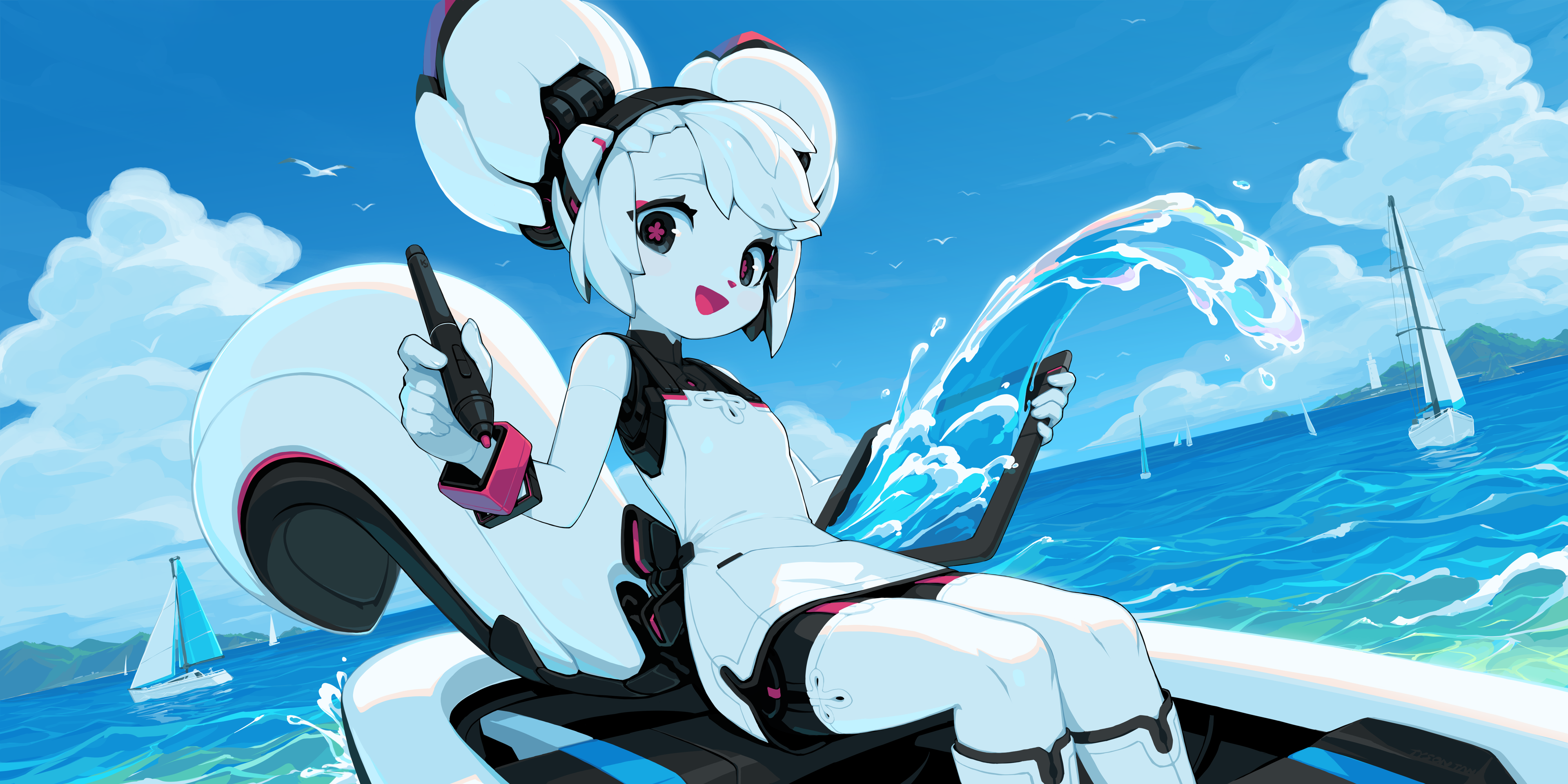
'Kiki Paints Over the Waves' by Tyson Tan
Text Tool
The text tool has been fully overhauled for 5.3! The main attraction is of course that text can now be edited directly on canvas, with full support for the usual keyboard and mouse interactions, as well as IME support. But we did not stop there! Lets go over some of the highlights:
Wrapped Text, Text in shape and Text on Path
Krita now has the ability to make auto wrapped text. You can drag an area to create a simple inline wrapping area, or click on a shape to have the text flow inside. In conformance with SVG 2, the text flow area can be composed of multiple shapes, with some adding and others subtracting from the final flow area.
Aside from wrapped text, you can also set the text to follow a path, as well as control the start position.
Text Properties Docker
The text properties docker allows you to style the text. This separate docker allows not only editing the current text selected with the text tool, but also multiple texts when selected with the shape selection tools. To ensure you do not get lost inside the list of 50+ editable properties, Krita will by default hide properties that have not been set on the selected text or its paragraph. You can configure the visibility rules of each of these to your liking, allowing you to hide properties you never use, or show all properties regardless.
A large part of the work on this was the font selector, as this required special indexing of the fonts on your system. Due this work, you can now select all types of fonts, from obscure postscript to modern opentype variable fonts (all axes included) inside the font selector. Beyond that, fonts are now resources can be tagged, searched, and will show localized names (and samples) if these were present inside the font.
With 50+ properties, it can be hard to remember your favourites. To this end, Krita now also has style presets, which allow you to quickly apply a selection of properties to the current text, or use them as a base for new text.
Glyph Palette
Another new addition is the glyph palette. The glyph palette allows you to select alternate glyphs that may be present in the currently used font. While the text properties docker allows configuring all the OpenType features in a font, the glyph palette is far more convenient. Furthermore, it allows selecting unicode character variations, which will be doubly handy for those typesetting in CJK scripts.
Type Setting Mode
In addition to the Text Properties Docker, you can edit a number of properties on-canvas with the new Type Setting Mode. This separate mode in the text tool provides controls to edit Font Size, Baseline Shift, Line Height and Dominant Baseline directly on canvas. When text is not auto-wrapped, you can even edit the position of every single glyph in detail!
Miscellaneous:
- All properties were given a bit of polish, which means that Krita has full support for CSS-Inline-3 Dominant and Alignment baseline. These properties are useful for configuring the alignment of text of different sizes when they are in scripts like Devanagari or Han script.
- The new text widgets are in QML, our first foray into modern QML.
- As a side effect of the text work, vector shape editing is now a little faster, and select all/deselect now work in all vector tools.
- Similarly, we now support SVG 2 paint-order property, which allows the outlines to be drawn behind the text.
Manual pages: Working with Text, Text Tool, Text Properties Docker, Font Family Resource and Style Preset Resource.
A variety of technical blog posts were written on the topic: Fonts, Open Type, Font Metrics, various other properties, Text in Shape and Type Setting Mode.

Community Spotlight: Weird Meeting by Sad_Tea
Tools
- A new Comic Panel Editing tool was added (MR 2331, manual). With this tool, you can split and merge vector objects quickly, making it easy to set up panel layouts for comics.
- Free transform bounding box rotation (MR 2113, manual) — Our transform tool draws a bounding box around the selected area. However, this was always in the direction of the pixels, which can be quite cumbersome when transforming a picture drawn at an angle. You can now rotate the transform bounding box with Ctrl + Alt to fit the visual angle of the selection you are transforming.
- Liquify Transform Mode speedups (MR 2461 — The liquify mode in the transforms tool was greatly sped up.
- Adjust smoothing based on stroke speed (MR 2192, manual) — This allows you to reduce smoothing of a stroke with the speed. The idea is that most jitters happen when drawing slowly, so naturally the smoothing needs to be higher when the brush stroke takes longer. Conversely, fast brush strokes need less smoothing.
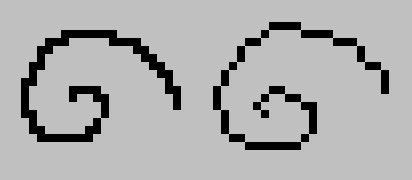
- Pixelart smoothing mode (MR 2158, manual) — Ken Lo's 2024 Google Summer of Code project, the pixel art stablizer provides better results when drawing with a single pixel line.
- Selection toolbar (MR 2422, manual — Ross Rosales' 2025 Google Summer of Code project, the selection toolbar provides a floating bar for when a selection is active.
- Multibrush has gained a 'Copy Translate at Intervals' mode (MR 1968, manual) — This allows drawing multiple brushes at set intervals.
- Improved number inputs in the shape selection tool (MR 2199) — You can now right-click these to set the units.
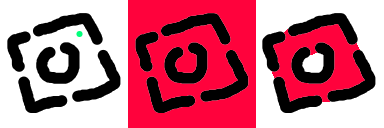
- The fill tool also got some love, now sporting Close Gaps functionality (MR 2050 and MR 2079, manual), which allows it to close gaps in the line work when determining the area to fill.

Community Spotlight: Skeleton and Cat by ShangZhou0
Assistants

- Configuration of the assistant widgets (MR 1966) — The on canvas widget for the assistants have been overhauled, and a duplication function has been added.
- Curvelinear perspective assistant. (MR 1960 and MR 2055, manual) — The curve linear assistant is an alternative to the fish-eye point assistant, and uses arcs instead of ellipses.
Filters and Layers
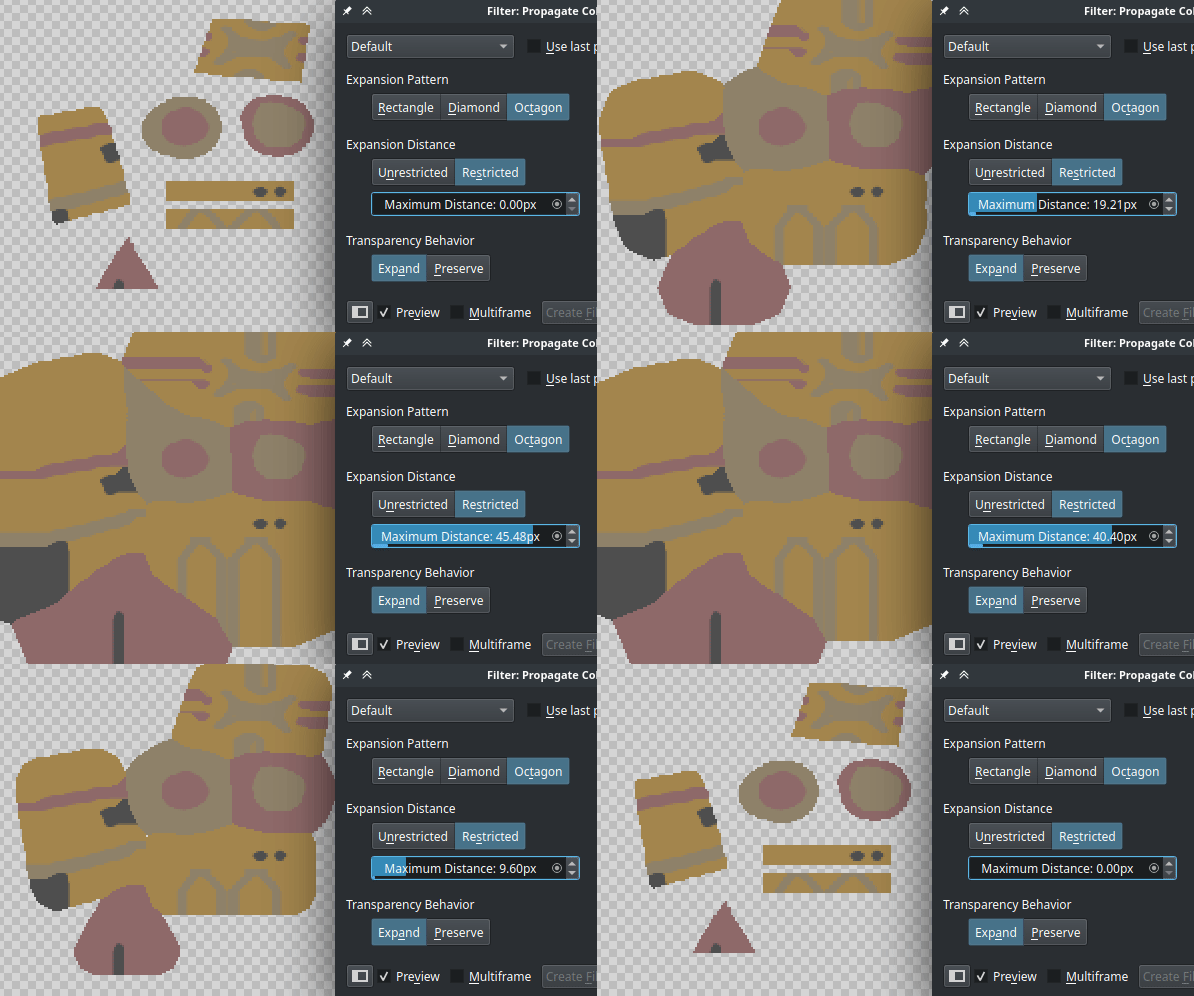
- Propagate Colors Filter has been added. This filter makes it so that an image with colors and transparency is modified to have its colors expand into the transparent areas. Such a thing is very useful for 3D and game texture workflows. There transparency often needs to be handled as a separate texture, and when the colors have been prepared with this filter, it reduces the chance of alignment issues between the transparency and the colors. (MR 2161, manual)
- Reset Transparent (MR 1860, manual — A filter related to the above. In the case that a transparent pixel has values, using reset transparent allows you to set all fully transparent pixels to be transparent black.
- All our blending modes got double checked for HDR support. Previously, Krita would sometimes clip high range colors when doing compositing with a given blending mode, even if the blending mode supported it. Now, every blend mode that supports HDR will do so. (MR 2294)
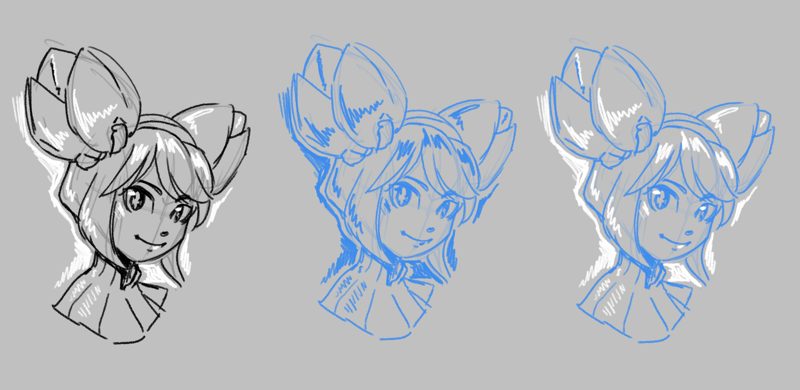
- Fast Color Overlay Mask. A filter that colorizes a sketch with a given color. This is different from the existing HSV filter, as it is optimized for speed and quick use, with a special button on the layer docker. This will be useful for artists preparing their sketch for inking. (MR 2285, 2318, 2303 and 2282, manual)
- Transform shortcuts now work on multiple layers. When using the Mirror, Rotate, Scale, Shear and Offset layer shortcuts while multiple layers are selected, all layers will be transformed (MR 1811).

Community Spotlight: Curly Hair by Celes
Dockers
- Real Time Capture Mode for the Recorder Docker. Previously, the recorder docker would only capture once every few frames for performance reasons. Now, multi-threaded capturing has been added to the docker, allowing for real time recording (MR 2010).
- Dockers can now be added to the pop-up palette. This replaces the on canvas brush editor, which in turn has been changed into a docker. As well, dockers can now also be added as a popup in the toolbar, by adding the "Docker Box" to the toolbar (MR 2062, MR 2104).
- Various improvements have been made to the Grids and Guides. In particular a new Isometric mode, which is a little bit more predictable to use, and can be used for hexagonal grids. Grid and guides color configuration is now saved to the document. And finally, there's the ability to turn off either the horizontal or vertical lines in the rectangular grid, allowing for a grid that is a mere line pattern. (MR 2090, manual)
Brushes:
Two new improvements were added for working with textures in the brushes.
- Soft texturing mode for the Pattern option (MR 2068, manual) — By default, Krita's texturing option uses the strength and pattern options together to limit the brush by the pattern, based on the strength. This gives a nice textured stroke, much like using a dry brush on a textured piece of paper in real life. The new Soft Texturing mode switches the behaviour of strength, making it instead control how much the pattern has effect on the brush, with at low values the pattern being invisible. This is more akin to switching between a wet and a dry brush over time.
- Pattern 'Auto Invert For Eraser' (MR 2264) — When working with the texture option, you might want to keep the texture cohesive, even as you erase. For this reason, we've now added the "Auto Invert For Eraser", which'll invert the texture as you switch to erase mode.

- Corner mode for curves (MR 2191, manual) — Krita's brush engine uses curves extensively to configure the effects of various sensors on the brush. By default, the points on this curve are smooth cubic curves, which is useful in most cases. However, sometimes you want a little bit more control, so Krita 5.3 now comes with the ability to make sharp corners by Ctrl + clicking a given node. Filters using curves also benefit from this feature.
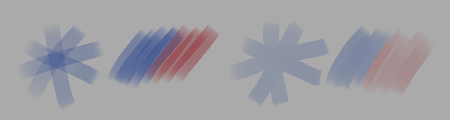
- Marker blend mode (MR 2375, manual) — a blend mode that prevents building up opacity across multiple strokes. When used with build-up painting mode, this gives the same effect as the same mode in Drawpile or the marker tool in other programs. Unlike Greater, Marker still blends colors normally even when it doesn't change the opacity of what's on the layer.

Files:
- Radiance RGBE (.hdr) support (MR 1806) — Krita 5.3 now has support for loading and saving Radiance RGBE files. This is an older but fairly widely used HDR image format, and it should be a boon for people working with HDR images.
- New Bundle Creator (MR 1802) — Srirupa Datta's GSoC project, which consisted of overhauling the bundle creator. It now tries to guide you through the bundle creation process, with a new feature being the ability to store tags into bundles as well.
- Jpeg-XL: You can now use CICP instead of ICC color profiles to store the color space, as well as save alpha in lossless mode (MR 2077).
- Jpeg-XL: Support was added for Multi-Layered and Multi-Pages JXL files in addition to animated JXL files (MR 2411).
- Support for Text, Shapes and Guides for PSD (MR 1954) — Krita can now load and save shapes, vector masks and guides from and to PSD. In addition, it can load text from PSD, including the advanced text information, like text on path and open type features. Saving text to PSD is possible, but unfortunately more limited due the complexity of the format.
Python Plugins:
This release contains several python API improvements. Most notable is that we now have an API for painting brushstrokes (MR 2195, MR 2198 and MR 2211).
Wrappers were added for the following qt widgets:
And finally we added more methods to...
- Scratchpad (MR 2087)
- Grids and Guides (MR 2087)
- Document autosave state (MR 2160)
- Canvas panning (MR 2338)
Finally, the following bundled python plugins were added:
- Brush Mutator Plugin (MR 2322) — A python extension for Krita which adds brush variation through artist-invoked settings randomization. When the Mutator extension is active, brush parameter (size, rotation, color, etc.) mutation ranges can be configured in the "Mutator Docker", and random mutations can be manually triggered via the "Mutate" action (bound to "z" by default).
- Python Palette Docker re-added (MR 2374) — The python palette docker was ree-nabled. This docker is largely meant for palette editing experiments, having support for export to gpl and svg.
- Workflow buttons docker (MR 2210) — The workflow buttons docker allows you to configure your own little docker with all sorts of buttons, with a highlight being the ability to order and resize them to your choosing.

First of 2025 by Montie (@carlomontie, @carlo_montie)
Other
- Separate eraser cursors for non-brush tools (MR 1624) — When drawing it can sometimes be hard to remember whether you are in eraser mode, so there's an update for all the tool cursors with an eraser icon.
- Pen tilt tweaks (MR 2314, MR 2337, manual) — Krita has support for the tilt direction reported by some models of drawing tablets. However, not all tablets support tilt, and furthermore, if you create a brush as a left-handed user, it can feel very different for a right handed user. To that end controls were added to allow adding extra pen tilt offset for different handedness, as well as the ability to set a default pen tilt when the tablet does not support tilt.
- Soft Proofing overhaul (MR 2279, manual) — Previously, our softproofing did not allow black point compensation on both transforms, leading to a difference in looks compared to converting the document to said profile directly. We've overhauled the softproofing settings to allow configuring both transforms, with defaults to use either the current monitor profile configuration or simulate paper white and black (Note: Wayland users, due the newness of the Wayland protocol, softproofing will behave a little differently in Absolute Colormetric mode, check the manual for more details).
- CSS palette support (MR 2119) — The palette docker can now load .css files with classes representing the swatches.
- More actions available in Canvas Input Settings (MR 1801) — This adds a variety of actions, like color sampler, deselect, layer activation and some tool activation to the canvas input settings so they can be activated by touch gestures.
- Save global color history, option to save per document (MR 1424) — Color history can now be saved either globally or per document.
- Zoom shortcuts now have the ability to zoom to mouse or zoom to canvas center separately (MR 2152) — Before Krita would use the mouse to zoom to cursor and the keyboard keys to zoom to center of the canvas. This split up makes it explicit to which of the two a shortcut will zoom. The default will now zoom to canvas center.
Contributors
A special thanks goes out to all our contributors, listed alphabetically:
- Agata Cacko — Liquify improvements, Knife tool.
- Aries Moczar — Assistant Editor Widget Redesign
- Bourumir Wyngs — Saving Color History support.
- Carsten Hartenfels — Android support, Marker blend mode.
- Deif Lou — Added Soft Texture Mode, Cusps for the brush editor curves.
- Dmitry — Reviewed all the MRs, softproofing overhaul.
- Emmet — Mutator plugin, animation bugfixes.
- Freya Lupen — Provided copy translate for multibrush, on canvas brush docker and helped a ton with porting and testing things on MacOs and Android.
- Florian Reiser — Real Time Capture Mode for the recorder docker.
- Grum999 — Improvements to the dimension spinboxes in the shape selection tool, grids and guides improvements.
- Halla — Administration, Qt6 port.
- Isaac Fleetwood — Provided the curve linear assistant.
- Ivan Yossi — many MacOS bugfixes and quality of life improvements.
- Ken Lo — Pixel Art Stabilizer.
- killy |0veufOrever — Smoothness stabilizer.
- Krayton Draws — More shortcut actions for touch gestures.
- Maciej Jesionowski — Pen Tilt Tweaks, Fast Color overlay.
- Mr. xk1000 — Zoom to Canvas Center/Mouse Cursor split.
- Rasyuqa A H — Radiance RGBE support, Jpeg XL.
- Ross Rosales — Provided the selection tool bar.
- Sharaf Zaman — Android support.
- Srirupa Datta — new Bundle Creator
- Stuffins — Rotating the transformation bounds.
- Thomas K/Bidi — CSS palette support.
- Timothée Giet — Added workflow button docker, handles icon quality.
- Wolthera — text tool, soft proofing overhaul, manual and writing the release notes.
As well as our community of artists, for providing feedback and bug reports during the beta period.
If you're curious what we're going to do next, check out the 2026 roadmap!

Like what we are doing? Help support us
Krita is a free and open source project. Please consider supporting the project with donations or by buying training videos or the artbook! With your support, we can keep the core team working on Krita full-time.
Donate Buy something